BlogConference playbook
Who to meet at ITC Vegas, and what to say to them
ITC is next week. About 10,000 people will be there, and only a small share of them matter to your pipeline. Finding that share usually means days of scrolling the event app and cross-checking it against your accounts. With your agent and the DealSurface MCP it takes about 20 minutes, and you finish with a personalized message for every stakeholder worth meeting.
Potential account targets
ITC has a big, messy attendee list. Your pipeline is big and messy too. The meetings worth having sit where the two overlap.
ITC by the numbers
- total attendees
- 10,000total attendees
- people from insurers, carriers and reinsurers
- 1,900people from insurers, carriers and reinsurers
A hypothetical insurtech pipeline
- products
- 3products
- target accounts
- 1,500target accounts
- mapped stakeholders
- 30,000mapped stakeholders
Five steps get you from two messy lists to meetings at ITC.
- 01Pull down your target account list1 min
- 02Pull out your stakeholders2 min
- 03Find them in the ITC app10 min
- 04Write personalized outreach5 min
- 05Send the messages5 min
The example throughout is SmokeSearch, which helps life insurers spot smokers during underwriting. Swap in your own product at each step.
Step 1Under a minute
Pull down your target account list
Who do I want to meet?
DealSurface already has your target accounts, ranked by how strongly each one needs what you sell. Ask your agent to pull them down with the DealSurface MCP. It takes under a minute.
PromptPull my target accounts
Using the DealSurface MCP, pull my target accounts for {my product} into a spreadsheet.

For each account, include the DealScore, the Buying Signal and the premium for the line I sell into. Sort by DealScore, highest first.

Then give me a short summary: how many accounts, and the top 10.No DealSurface MCP key yet? Book a call to get one.
Step 2A couple of minutes
Pull out your stakeholders
Who at each account actually decides?
DealSurface maps the buying committee at each account: who signs, who decides, who champions it and who can block it. Ask your agent to pull the people at each account with the DealSurface MCP. It takes a couple of minutes.
PromptList the buying committee at my top accounts
Using the DealSurface MCP, list the buying committee at each of my target accounts.

For each person, include their name, title, role and LinkedIn. Mark the top picks.

Put it in a spreadsheet grouped by account, highest DealScore first, and add an empty "At ITC?" column I can fill in.
You now have a short list of names to look for, with the people who matter most marked.
Step 3About 10 minutes
Find them in the ITC app
Which of my stakeholders are coming?
Check each account on your list against the ITC app and mark who is attending. Your agent can run the searches with you, one account at a time, in about 10 minutes.
- 01Sign in to the ITC app in your browser with the email you registered with (Grip sends a one-time code).
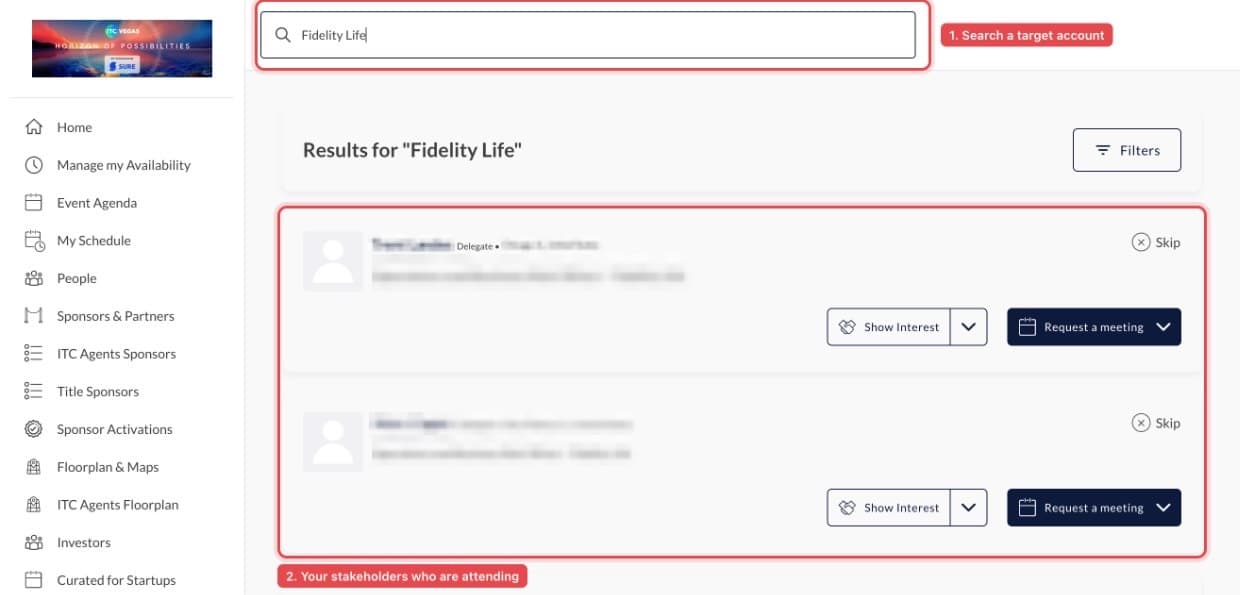
- 02Ask your agent to search the app for each account on your list and mark who is attending. It runs the same searches you would, just faster.
PromptFind my stakeholders in the ITC app
Help me check which of my stakeholders are going to ITC. I'm signed in to the ITC app in my browser.

Go through my stakeholder list one account at a time. Search the app for the company name, the same way I would, and mark each person on my list as attending or not.

If a company comes back empty, try its brand or parent name before marking it.

Only record people who are on my list. Don't copy the attendee list, and don't message or request meetings with anyone.
Prefer to do it yourself? Type the account name into the app's search bar. Everyone registered from that company comes up.
- 03Ask your agent to create a brief of your accounts that will and will not be at ITC.
PromptBrief me on who will be at ITC
Using the DealSurface MCP and my checked stakeholder list, create a one-page brief of my accounts that will and won't be at ITC.

For each account at ITC, show who's coming, their role, and the top picks who aren't. Add DealSurface's recommendation for each one.

List the accounts with no one attending at the end.
Here is what that looks like for Fidelity Life.
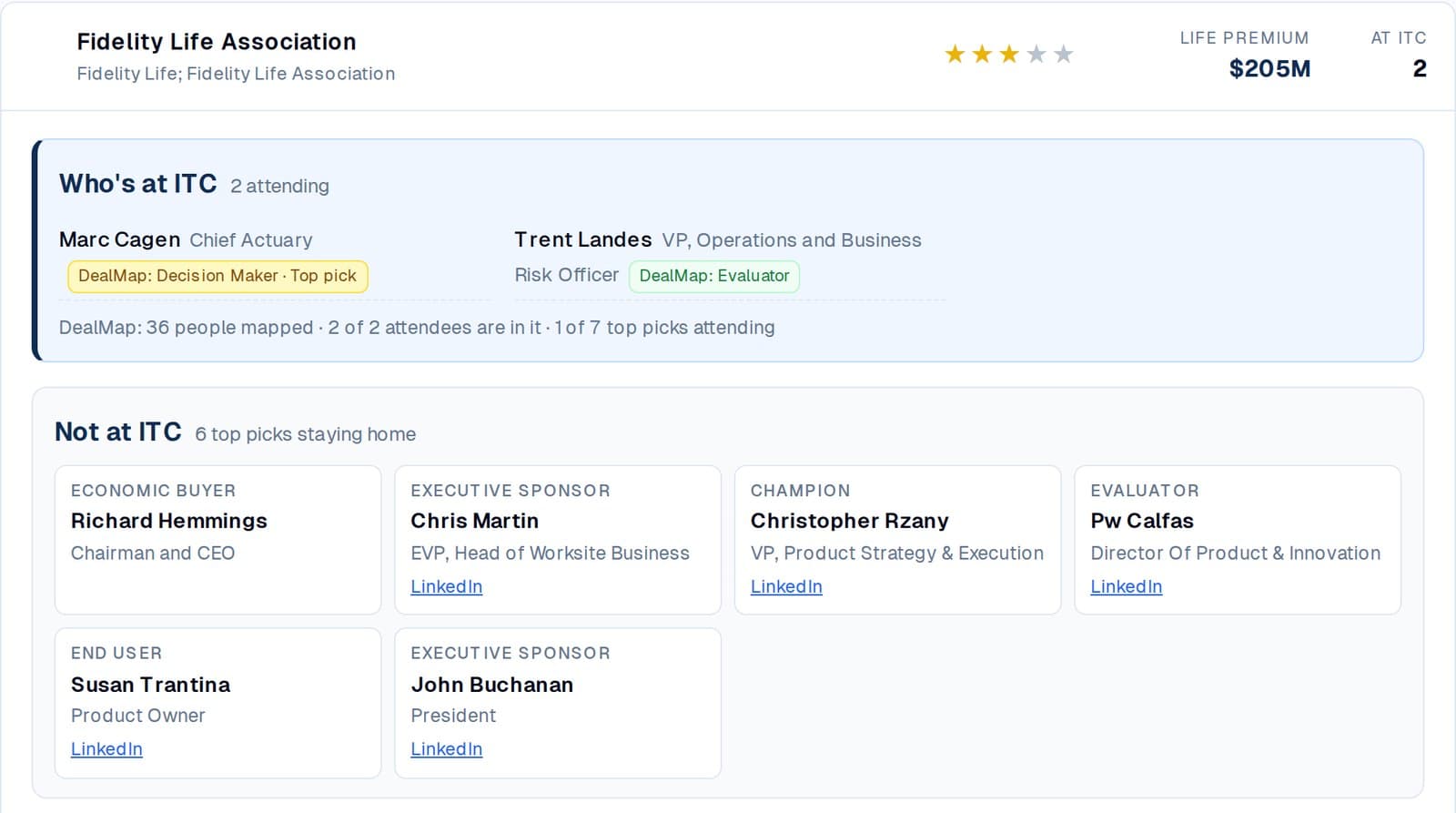
Two people are coming, including the Decision Maker. The Economic Buyer and the Champion aren't, so ITC is your opening and the follow-up is where the deal moves.
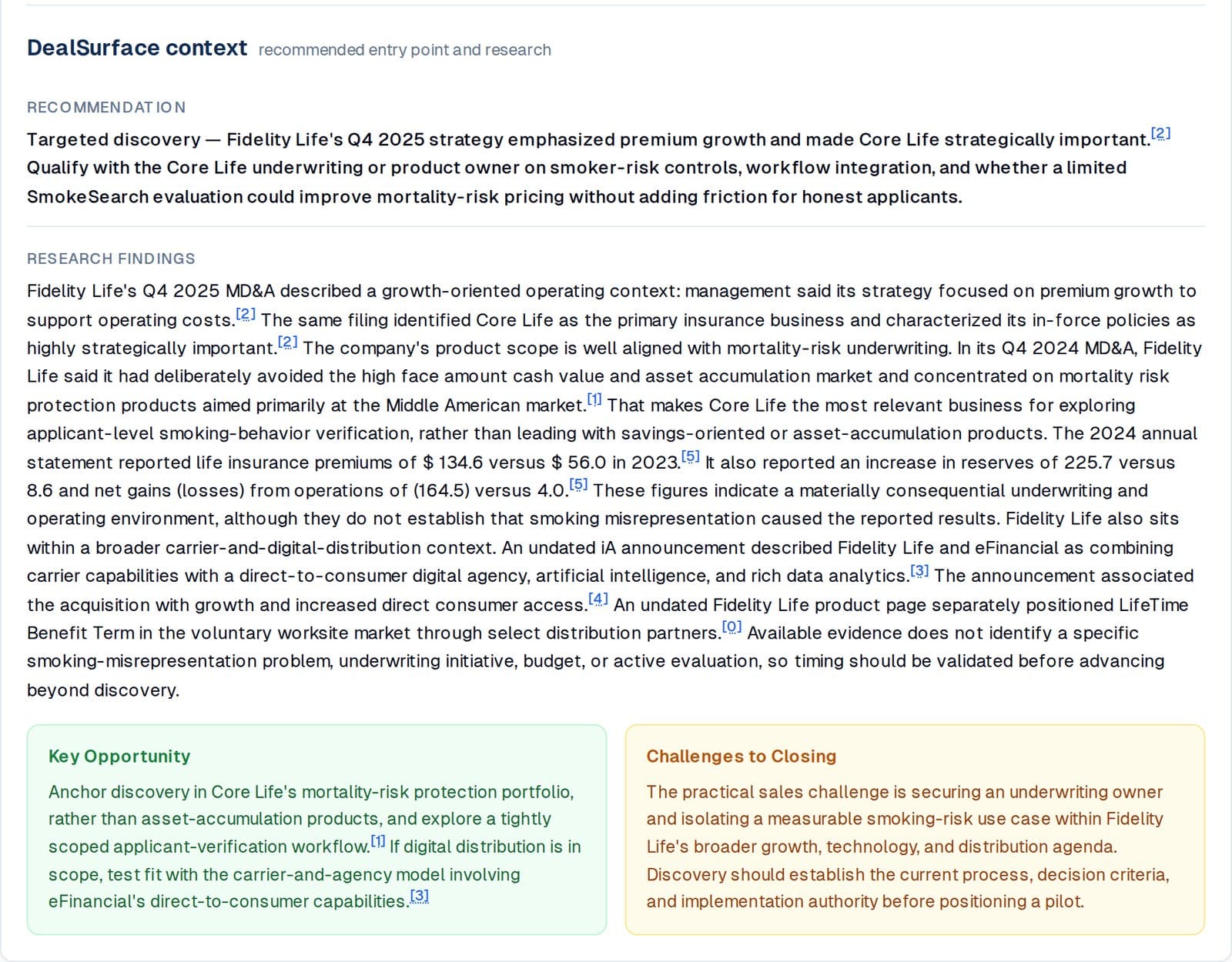
DealSurface also gives you the recommended entry point and the research behind it. Come in armed. This may be your best shot of the year with this carrier, so put it in your prep notes, strategy doc or CRM.
Step 4About 5 minutes
Write personalized outreach
What can I say that makes this person want 15 minutes with me?
Your agent drafts one message per person with the DealSurface MCP, using what DealSurface found in each company's filings and the person's role in the deal. It takes about 5 minutes.
PromptWrite outreach for my ITC list
Using the DealSurface MCP, write a short, friendly note to each person on my ITC list. Two or three sentences, no subject line. It should read like a quick message, not an email.

Base each one on one thing DealSurface found about their company, and write it for their role in the buying committee.

End each note by inviting them to connect at ITC and mentioning my booth number.

Don't send anything. Show me the drafts.
Two drafts for the Fidelity Life attendees
Decision Maker
Marc Cagen
Chief Actuary, Fidelity Life
Hi Marc, I see Fidelity is growing its Core Life business. SmokeSearch identifies the smokers in the mix.
Let's connect at ITC. I'll be at booth 2579.
Evaluator
Trent Landes
VP, Operations and Business Risk Officer, Fidelity Life
Hi Trent, I see Fidelity is strengthening reserves alongside the Core Life business growth. SmokeSearch identifies misclassified smokers in the application process.
Let's connect at ITC. I'll be at booth 2579.
Step 5A few minutes
Send the messages
Where will this person actually read it?
Send from wherever you already work. Open the channel you use.
Email, sent from DealSurface
The drafts and the email addresses are already in DealSurface, so there's nothing to export. Your agent shows you the final list, waits for your OK, then sends.
PromptSend approved drafts through DealSurface
Using the DealSurface MCP, email the drafts I approved.

Show me the final list first and wait for my OK. Then send each message and tell me what went out.
The ITC app
Every attendee can be reached in the app, and it's where people look for meetings during the show.
- 01Open People and search for the person by name.
- 02Open their profile and click Request a meeting. Pick a slot that works for you both.
- 03Paste the draft as the note. If you'd rather not propose a time yet, start a chat with the draft instead.
The drafts from Step 4 are already short enough to paste as-is.
Email or LinkedIn, from your sales engagement toolApollo, Amplemarket, Instantly, HeyReach
Your agent can load the drafts into a sequence through the tool's API, for email or LinkedIn. The pattern is the same everywhere:
- 01Check every contact first. Use the email DealSurface already has and fill gaps with your enrichment tool.
- 02Build a one-step sequence whose body is a single custom field, so each person gets their own draft.
- 03Add the contacts through the API, with each person's subject and message in their custom fields.
- 04Review the sequence and activate it yourself.
Amplemarket
POST /sequences/{id}/leadsTakes each lead's email, LinkedIn URL and a data object for the personalized fields, up to 1,024 characters each. It checks duplicates, your exclusion list and recent contact history on the way in. Docs
Instantly
POST /api/v2/leads/addAdds up to 1,000 leads to a campaign, each with a personalization field and custom variables. Flags like skip_if_in_campaign keep you from double-sending. Docs
Apollo
POST /emailer_campaigns/{sequence_id}/add_contact_idsThe person has to exist as a contact first, with the draft in a custom field. This call adds them, with the mailbox to send from. It needs a master API key. Docs
LinkedIn's official API doesn't allow automated outreach, so the options depend on the tool.
- Amplemarket sequences can run LinkedIn steps from your connected account, paced to LinkedIn's limits. Load the leads with the same API call as email.
- HeyReach and Unipile send from your own LinkedIn account through their API.
- Apollo LinkedIn steps are tasks you complete by hand. Apollo shows the draft and you send it on LinkedIn.
Direct messages only reach first-degree connections. Anyone else needs a connection request or an InMail.
SmokeSearch data from DealSurface. Attendee figures from ITC Vegas.